
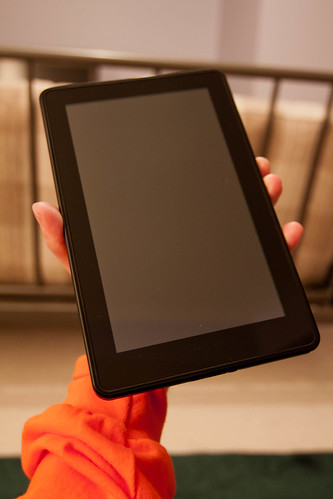
After weeks of waiting, I finally got my hands on Fire…Kindle Fire.
Kindle Fire represents Amazon’s initial foray into the Tablet market. Retailing at US$199.00 the Kindle Fire is a 7 inch tablet that seamlessly integrates Amazon’s ecosystem of books, music, video and magazine services. Included in the cost of the tablet is a free month of Amazon Prime. Prime allows the Kindle Fire user to access movies, read bestselling books and it includes free two day shipping directly from the Kindle Fire.

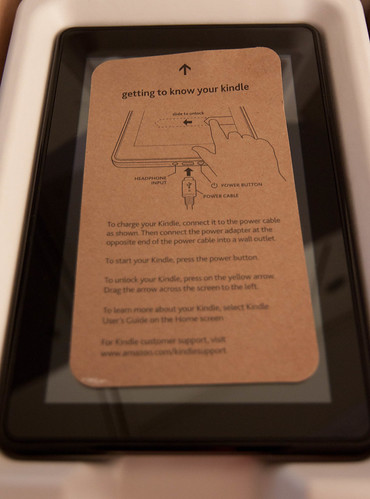
What comes in the box? One Kindle Fire, one U.S. power adapter, and a quick start guide – a very brief quick start guide. I’d like to start this review with a look at the design and features of this tablet. The quick start guide leads you to the Kindle Fire home screen where you can access a user guide with more detailed information on the device.
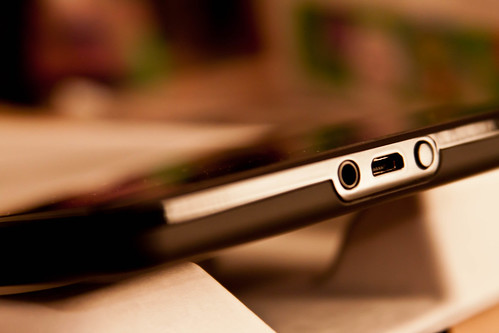
Handling the device, I found it to be solidly constructed with a soft rubberized backing that allows for a good grip on the device. Thin and sleek, the design is interrupted by a power button, USB 2.0 (micro-b) and stereo audio jack (pictured below).
Kindle Fire’ specs as per Amazon:
- 7″ multi-touch display with IPS (in-plane switching) technology and anti-reflective treatment, 1024 x 600 pixel resolution at 169 ppi, 16 million colors.
- 14.6 ounces (413 grams).
- 8GB internal. That’s enough for 80 apps, plus either 10 movies or 800 songs or 6,000 books.
- Free cloud storage for all Amazon content.
- Up to 8 hours of continuous reading or 7.5 hours of video playback, with wireless off. Battery life will vary based on wireless usage, such as web browsing and downloading content.
- Supports public and private Wi-Fi networks or hotspots that use the 802.11b, 802.11g, 802.11n, or 802.1X standard with support for WEP, WPA and WPA2 security using password authentication; does not support connecting to ad-hoc (or peer-to-peer) Wi-Fi networks.
- USB 2.0 (micro-B connector)
- 3.5 mm stereo audio jack, top-mounted stereo speakers.
Kindle Fire runs on a dual core processor powered by Android 2.3 OS. Owners can access the internet using Amazon Silk web browser. A question I frequently encounter is ability to ‘root’ the Android OS in order to customize the device. The answer is yes, there is a way to ‘root’ the Android OS. At this time, I have no plans to partake in this type of customization of the Kindle Fire.
With this pre-ordered Kindle Fire, I broke two cardinal rules. First, this was my first blind pre-order of a tech gadget. I knew nothing about the product but within 5 minutes of clicking on a Twitter link, I completed my pre-order. Second, it is a first generation tech gadget and I never purchase first generation anything – until Kindle Fire.
The Kindle Fire arrives with a partially charged battery allowing the user to register the device. The device quickly locates potential wifi hotspots. Once connected to the internet all your stuff – now residing in a Cloud – will appear in a snappy bookcase design. You have the ability at this point to download select items from the Cloud. The registration and download perform seamlessly and as promised the device disappears while you are viewing the contents on your device. Since I have wireless internet, this process was completed in the comfort of my home. If you do not have home wifi access, you will have to find a wifi hotspot elsewhere in order to complete this process.
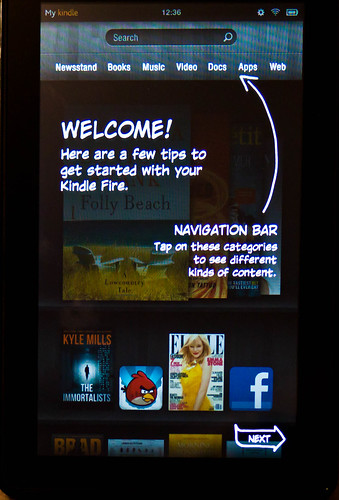
Navigating around the Kindle Fire using the touch screen is very intuitive and responsive. The bookcase design allows you to scroll through your items – think Rolodex – until you find the item of interest. The screen switches quickly from portrait to landscape as you rotate the device. A navigation bar allows you to quickly access specific categories of content.
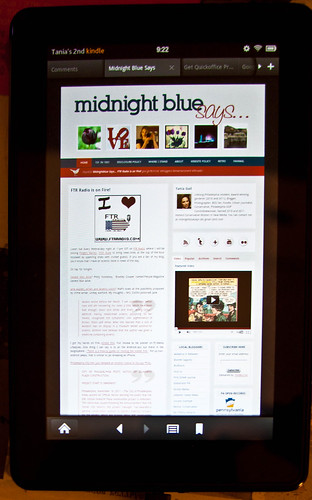
The device comes with a web browser developed for Amazon called Silk. This browser lives on the device and in the Cloud. The idea of this sharing is to cut down on load time on the device. This is not a novel idea, the Opera browser has already deployed this type of technology. As you can see in the photo below, there is the ability for tabbed browsing within Silk. As promised by the shared technology, the pages loaded quickly as I explored the web with this browser.
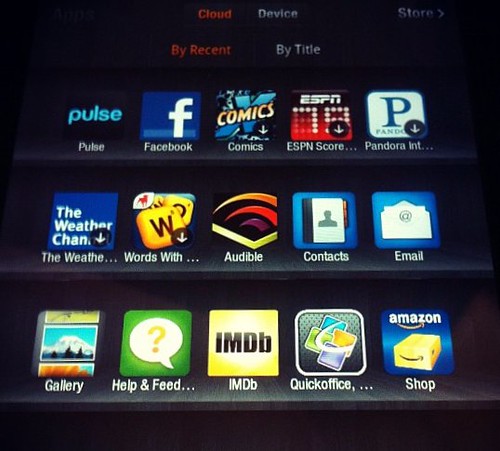
Pictured below is the library of apps on the device. As I write this review, news comes to my attention that Android App Market can now be installed on the Kindle Fire. While this is not as robust as the Apple App market, it may appease those who are concerned about the anemic number of apps available for Kindle Fire. I found two useful and free apps available on the Kindle Fire that can be used offline – Springpad and Evernote. I use Springpad extensively on my iPhone and desktop and now this app is running on my Kindle Fire.
I’m currently trialing Martha Stewart’s Living magazine on the Kindle Fire. The magazine can be read in portrait (pictured below) and in landscape (pictured below). I found it was easy to swipe through the magazine pages, but found myself enlarging the pages to more easily read the text. There is a pop up scroll bar that allows you to jump to a particular page you are looking for instead of paging through the entire magazine.

Landscape magazine view with scroll bar index:

Having access to Amazon Prime’s video ecosystem, I was delighted to discover the entire collection of Julia Child’s ‘The French Chef’ series.

While this tablet has often been compared to the iPad, there are crucial differences between the two devices. The Kindle Fire does not include GPS, video camera, SD expansion slot and access to a 3G network. The device comes with 8 gigs of storage which is reported to hold either 10 movies or 800 songs. However, this device is priced several hundred dollars less than the iPad, and I believe, it is a different species of tablet all together.
The Kindle Fire is a phenomenal book, music and video content delivery device with a few bells and whistles; such as the apps collection and Silk browser. I see this tablet as a mobile library and entertainment device, whereas the iPad is developing in the direction of replacing a laptop. One device will not replace the other and the question remains would you consider owning both devices?
After playing with Fire for a few days, I have cobbled together a list of pros and cons of this device which hopefully will help in the decision to purchase.
Pros:
- US$199 price point.
- Sturdy construction and solid weight.
- 7 inch screen is not too big nor too small; it is just the right size for mobile viewing of movies or reading a novel.
- Balanced sound and beautiful image quality of the videos and magazines.
- Although many have expressed concern over the number of applications, I found all the applications I wanted to add to the Kindle Fire.
- Cloud technology to store your music, books and video. With limited amount of on-board storage, 8 gigs, having access to Cloud storage makes up for this storage deficiency.
- The device delivers content seamlessly and quickly – you nearly forget the device is there as you engage in reading a book or watching an episode of ‘The French Chef’.
- You will not need to invest in ‘Kindle Fire for Dummies’ as the navigation around the device seems natural and intuitive. If you happen to lose your way, the home key is always available.
Cons:
- No 3G access. Many Kindle users are happy with the 3G access on older devices. With the inclusion of the Amazon Prime ecosystem within the Kindle Fire and a limited 8 gig of on-board storage, it seems counter intuitive to not have 3G access.
- Amazon Prime instant videos for Prime subscribers do not include recent releases of either movies or television series. If you want to catch up on the last season of the Walking Dead be prepared to shell out US$1.99 per episode. Considering that I caught up on last seasons episodes with Comcast OnDemand for free, I cannot justify purchasing these episodes.
- No Text to Speech, however, I have heard that this may be included in a software upgrade.
- Battery life is short, then again, I’ve encountered the same problem with every mobile device I own. Battery life never seems to live up to its advertised promise.
I do not own an iPad at this time as I view the iPad as a rather expensive iPod Touch. I’m patiently waiting for the iPad that will replace my laptop. When that version is released, I will be the first in line to purchase one.
Every mobile media device has its good stuff and not so good stuff; it comes down to customers deciding if the good outweighs the bad. With this information in mind, I would recommend the Kindle Fire to anyone looking to purchase a Tablet and is leery about splashing out several hundred dollars on an iPad. It delivers entertainment content flawlessly and contains enough elements of the more pricier iPad to make the investment in this device worthwhile.
Well done, Amazon.